How to setup your facilities
Admittee is a facility-first platform. Before creating events, rentals, or registrations, it’s important to organize your facilities in a way that reflects how your organization actually operates.
A thoughtful facility setup helps prevent conflicts, streamlines approvals, and makes scheduling easier for everyone. This guide walks through best practices for structuring facilities in Admittee, using real-world examples to help you get started with confidence.
Understanding the facility structure
Facilities in Admittee are organized in two layers: parent facilities and sub-facilities. This structure allows you to schedule an entire space when needed, or schedule smaller portions of it when the space is shared.
Parent facilities represent full spaces that are sometimes booked as a whole, such as a main gym, football field, auditorium, or performing arts center. If you might ever schedule the entire space at once, it should exist as a parent facility.
Sub-facilities are used when a space is regularly divided or shared by multiple groups at the same time. Common examples include gym courts, sections of a practice field, breakout rooms within a larger space, or divided areas of a theater or multi-purpose room. Sub-facilities provide clearer visibility into how a space is used, allow independent scheduling without conflicts, and support more accurate approvals and reporting.
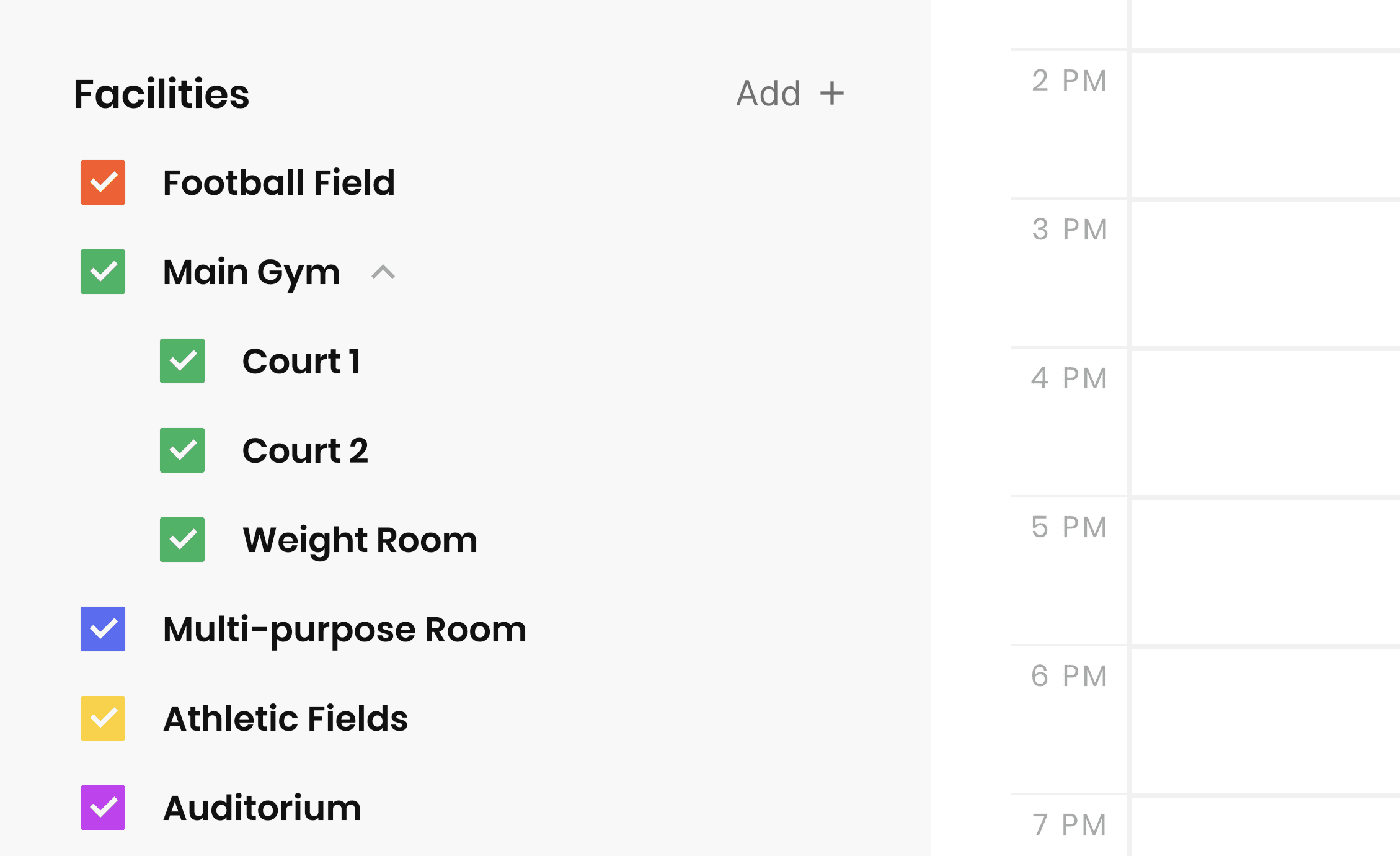
Example: A gym with partitions
Many schools use their gym in different ways throughout the week. In this case, the gym works best as:
Parent facility: Main Gym
Sub-facilities: Court 1, Court 2, Weight Room
This setup allows assemblies or games to book the entire gym, while practices or workshops can reserve individual courts. The shared calendar clearly reflects how the space is being used.
A typical campus facility setup
Most organizations start with their most frequently scheduled spaces. You can always add or refine later. Starting simple and growing over time helps keep your facility structure clear, flexible, and easy to manage. A common starting setup might include:
Main Gym (with courts as sub-facilities)
Football Field
Baseball Field
Multi-Purpose Room
Auditorium
Library
Creating a facility in Admittee
When creating a facility, admins can configure key details that affect scheduling, approvals, and visibility. Each facility can include:
Name – Use clear, recognizable names that match how staff refer to the space
Capacity – Helpful for planning events, rentals, or registrations
Photo – Makes it easier for staff and renters to identify the space
Address – Useful for campuses with multiple buildings or external renters
Calendar color – Each facility has a unique color for quick visual scanning
Unique iCal feed – Each facility generates an iCal link that can be added to external calendars
Consider adding sub-facilities when:
A space is regularly divided (for example, a gym with multiple courts)
Multiple groups use the same space at the same time
You want clearer approvals, scheduling, and reporting
Tip: Avoid adding sub-facilities if a space is almost always scheduled as a single unit. In those cases, a single parent facility is usually sufficient and easier to manage.
Assigning approvers by facility
Each facility and sub-facility can have its own approver. Requests automatically route to the right person, reducing delays and confusion. This is especially helpful when:
Athletics manages gyms and fields
Performing arts manages theaters
Administration oversees large or special events
Best practices for long-term success
A few guidelines we see work well across schools and organizations. The goal is clarity, not perfection:
Start simple and expand over time
Model how spaces are actually used
Use sub-facilities only where sharing is common
Assign clear approvers for accountability
Use iCal feeds to keep other systems in sync
What to do next
A strong facility foundation makes everything else in Admittee faster, clearer, and easier to manage. Once your facilities are set up:
Review your shared calendar
Create your first event
Invite teammates so everyone works from the same system
How to setup your facilities
Learn best practices for setting up facilities and sub-facilities in Admittee to keep scheduling, approvals, and events running smoothly.
Written By: Jeremiah Simpson
Last Updated on Jan 27, 2026
Admittee is a facility-first platform. Before creating events, rentals, or registrations, it’s important to organize your facilities in a way that reflects how your organization actually operates.
A thoughtful facility setup helps prevent conflicts, streamlines approvals, and makes scheduling easier for everyone. This guide walks through best practices for structuring facilities in Admittee, using real-world examples to help you get started with confidence.
Understanding the facility structure
Facilities in Admittee are organized in two layers: parent facilities and sub-facilities. This structure allows you to schedule an entire space when needed, or schedule smaller portions of it when the space is shared.
Parent facilities represent full spaces that are sometimes booked as a whole, such as a main gym, football field, auditorium, or performing arts center. If you might ever schedule the entire space at once, it should exist as a parent facility.
Sub-facilities are used when a space is regularly divided or shared by multiple groups at the same time. Common examples include gym courts, sections of a practice field, breakout rooms within a larger space, or divided areas of a theater or multi-purpose room. Sub-facilities provide clearer visibility into how a space is used, allow independent scheduling without conflicts, and support more accurate approvals and reporting.
Example: A gym with partitions
Many schools use their gym in different ways throughout the week. In this case, the gym works best as:
Parent facility: Main Gym
Sub-facilities: Court 1, Court 2, Weight Room
This setup allows assemblies or games to book the entire gym, while practices or workshops can reserve individual courts. The shared calendar clearly reflects how the space is being used.
A typical campus facility setup
Most organizations start with their most frequently scheduled spaces. You can always add or refine later. Starting simple and growing over time helps keep your facility structure clear, flexible, and easy to manage. A common starting setup might include:
Main Gym (with courts as sub-facilities)
Football Field
Baseball Field
Multi-Purpose Room
Auditorium
Library
Creating a facility in Admittee
When creating a facility, admins can configure key details that affect scheduling, approvals, and visibility. Each facility can include:
Name – Use clear, recognizable names that match how staff refer to the space
Capacity – Helpful for planning events, rentals, or registrations
Photo – Makes it easier for staff and renters to identify the space
Address – Useful for campuses with multiple buildings or external renters
Calendar color – Each facility has a unique color for quick visual scanning
Unique iCal feed – Each facility generates an iCal link that can be added to external calendars
Consider adding sub-facilities when:
A space is regularly divided (for example, a gym with multiple courts)
Multiple groups use the same space at the same time
You want clearer approvals, scheduling, and reporting
Tip: Avoid adding sub-facilities if a space is almost always scheduled as a single unit. In those cases, a single parent facility is usually sufficient and easier to manage.
Assigning approvers by facility
Each facility and sub-facility can have its own approver. Requests automatically route to the right person, reducing delays and confusion. This is especially helpful when:
Athletics manages gyms and fields
Performing arts manages theaters
Administration oversees large or special events
Best practices for long-term success
A few guidelines we see work well across schools and organizations. The goal is clarity, not perfection:
Start simple and expand over time
Model how spaces are actually used
Use sub-facilities only where sharing is common
Assign clear approvers for accountability
Use iCal feeds to keep other systems in sync
What to do next
A strong facility foundation makes everything else in Admittee faster, clearer, and easier to manage. Once your facilities are set up:
Review your shared calendar
Create your first event
Invite teammates so everyone works from the same system